VISUALSOUND is a modular instrument where audio and visuals live on the same canvas. Oscillators sit next to fluid simulations, a sequencer can play a filter or a kaleidoscope, and the same LFO that breathes through your delay can breathe through your colors. Signal flows left → right, always.
There are no pages, no hidden menus, no mode switches between "making sound" and "making image". You patch, it plays. The canvas zooms from the whole show down to a single knob, and everything you see — every cable, every meter, every glow — is the actual signal, live.
Six kinds of signal
Audio — sample-rate sound. Oscillators, samplers, effects, the master OUT.
Control — slower signals that play knobs: LFO, envelopes, sequencers, MIDI, math.
Visual — GPU textures flowing between generators and effects, ending at VOUT.
Geometry — 3D shape flowing between sculpting nodes, rendered by the LENS (see 3D Geometry).
Data — words, numbers and flags at tick rate: SCRIBE writes them, TEXT reads them (silver cables).
Notes & gates — pitch and trigger streams riding the control domain (SEQ, ARP, MIDI, VOICES).
Each domain has its own cable color, and ports only accept matching cables — the patch stays honest by construction. Audio reaches the visual world through one gate only: the FFT bridge (see Cables & Domains).
The app opens on Welcome — a living factory patch, already playing, wired to be pulled apart. That's the fastest way to learn the instrument: understanding by unscrewing. (Save any patch as your Init from the preset browser and the app will boot on yours instead.)
TIP
Everything in this manual is in the app right now — open the module browser with the + button and patch along as you read.
YOUR FIRST PATCH
From silence to sound and light in two minutes.
Sound
Tap the + button (bottom right) and add an OSC, a FILTER and an OUT.
Drag from OSC's output port to FILTER's in, then FILTER's output to OUT.
Press PLAY in the header. Drag the cutoff bar on the FILTER — the sound follows your finger.
Movement
Add an LFO. Cable its output into FILTER's cut port — the cutoff now breathes on its own.
Add a SEQ and cable note → OSC note. Open its editor (the ≡ chip on the node) and draw a phrase.
Light
Add an FFT, a PLASMA and a VOUT.
Cable OUT's source (or the FILTER output) into FFT in, FFT out into PLASMA's warp inlet, PLASMA into VOUT.
The canvas background ignites — the plasma is now dancing to your filter.
TIP
Double-click any cable to open a probe: a live inspector bubble — waveform for audio, value for control, thumbnail for visual. Double-click again to close it.
That's the whole grammar: sources → processors → OUT for sound, generators → effects → VOUT for image, and control signals played into any port that will take them. The rest of this manual is depth, not new rules.
THE CANVAS
An infinite, GPU-drawn worksurface.
Moving around
drag empty spacepan the canvas
pinch / scroll / mouse wheelzoom — from the whole patch to one knob
⤢ buttonfit the whole patch in the window (bouncy)
double-tap a nodezoom in on it
Editing
drag a node headermove it (snaps to the grid when SNAP is on)
drag port → portconnect — only matching domains take
drag a cable endre-route it; drop in space to delete
hold a plugged port ~1 sthe cable pops off — drag it to any compatible port (it lands with a boing)
marquee button + dragrubber-band select many nodes
wand buttonauto-arrange the patch left → right
⌘C / ⌘V / ⌫copy, paste, delete the selection
On every node
Power LED (top-left): tap to bypass. Audio passes through clean, everything else mutes; the node dims under a veil. Saved with the patch.
? chip (just left of the editor chip — on EVERY node): the node's full inline manual — what it does, every inlet, outlet and parameter explained, and a TRY THIS patch. For deep help on any module, the ? is always the shortest path.
Param bars: drag horizontally to set, double-tap to reset to default — the app-wide law.
Chips (dropdown values): tap to open the picker; discrete values switch instantly, no zipper.
SPARK nodes put a playable button right on the node face — tap fires a gate, or flips a toggle.
Probes
Double-click any cable to spawn an inspector right where you clicked: audio cables show a live waveform, control cables a numeric readout, visual cables a texture thumbnail. Probes ride with the patch until you close them.
Grid & snap
The dotted working grid keeps large patches tidy; SNAP quantizes node positions to it. When a VOUT drives the background the grid politely hides — the visuals own the stage. (You can bring the grid back at any time with the visuals-off button, next chapter.)
TIP
Selected node? The footer shows its type and a rename field. Names live on the node face and in exposed subpatch controls.
CABLES & DOMAINS
Typed, colored, honest.
Every port has a domain, every cable takes its color from its source, and connections only land where the domain matches. Thick cables carry textures; audio cables that go stereo draw as a twin strand so you can read the signal path at a glance.
Stereo
STEREO merges two mono signals into one stereo cable; GRANULAR, KINETIC, SAMPLER, LOOPER and the big effects (DELAY, REVERB, PITCH, FREEZE, RESONATOR) are stereo by nature. Stereo-ness propagates through processors automatically — GAIN on a stereo signal stays stereo, and the twin strand shows it.
The FFT bridge law
Audio never plugs straight into a visual port. It crosses through FFT — an analysis bridge with gain, band select (FULL / LOW / MID / HIGH), attack, release, floor and invert. That shaping is what makes visuals playable: a loud mix doesn't pin everything at maximum, a kick can hit only the low band, and an inverted envelope can carve darkness into light.
…and the reverse gate
The loop closes the other way through SONIFY: a texture scanline becomes a single-cycle wave — light drives sound. Point it at a LUMEN, feed its output back through the FFT, and the patch listens to what it paints.
Control into anything
Every audio node carries control inlets for its main parameters — cutoff, drive, mix, threshold, level… — and every visual node has one control inlet per knob. A patched control signal adds to the knob, clamped to its range: the knob sets the center, the signal plays around it.
PORTAL — wireless cables
PORTAL▸ transmits, ▸PORTAL receives: same channel + same type = a connection with no cable drawn, working across subpatch boundaries and in every domain, textures included. For big patches and clean stages.
NOTE
Cables to vanished ports (say, after re-shaping a subpatch) are dropped automatically — the patch never plays ghosts.
TRANSPORT & HEADER
The cockpit: one row, everything that matters.
Left cluster
Logo — tap for About.
Undo / Redo — whole-patch snapshots; continuous gestures (a knob drag, a node move) coalesce into single steps.
Marquee · Arrange · Fit · Grid · Snap — canvas tools; active tools glow teal.
New canvas — a clean slate (your current patch stays in Presets if you saved it).
Preset pill — the current patch name; the amber LED means unsaved changes. Tap to open the library.
Tempo & transport
Tempo stepper — tap the number to type an exact tempo (40–240); the stacked arrows step ±1 BPM, and holding one accelerates. In a DAW (AUv3) the host owns the tempo and this becomes a readout.
Beat dot — flashes on the beat, from the transport clock, not from audio.
PLAY — starts the engine and rewinds the musical clock to bar 1: loops, synced LFOs and sequencers all start in phase. The chip lights teal while playing.
TO CLOCK — LFO and TIMELINE each carry a clock toggle that lets them bend the tempo itself (±25%, smoothed): a slow LFO breathes rubato through the whole patch, a TIMELINE curve draws an accelerando over minutes. While the clock is bent, the stepper digits turn teal and show the live BPM; the knob keeps your base tempo.
Clock physics — a fast LFO into the clock cancels itself out within each step (the pushes and pulls average to almost nothing). That's physics, not a bug: use slow rates for rubato, or an S&H LFO synced to 1/1 for a ladder of clean tempo jumps.
Record & perform
REC — records the session: audio always, video when a VOUT is live. Long-press for offline bounce (master 4/8/16 bars, or stems per OUT). See Recording & Export.
MIDI — MIDI-learn mode: tap a knob, move a controller CC, done. Amber while armed.
MOT — motion record: your knob gestures loop over 4 bars. Long-press to clear all loops.
LINK — arms the remote bridge: iPhones on your Wi-Fi become stage controllers. The chip counts connected remotes. See VS Remote.
tv.slash — hide the visual output and work on modules + grid; visuals keep running offscreen.
sparkles.tv — installation mode: visuals full-screen, zero chrome. Esc or tap to come back.
CPU meter — app CPU, Activity-Monitor scale (100% = one core). Green under 50, amber under 100, red above.
MODULE LIBRARY
Every machine in the instrument, generated live from the instrument itself.
LIGHT becomes SOUND — a texture scanline is the wave
PLUGSYNTH
Hosts any Audio Unit instrument — played by the patch
VYPER
Voltage in, venom out — the line that writhes, screams and slides
KEYS
A playable keyboard — panel under your fingers, four voices
MODULATION 10
LFO
Cyclic modulator, free or tempo-synced
S&H
Sample & hold with glide
ENV
ADSR envelope with gate + retrig
FOLLOW
Envelope follower — audio to control
CLOCK
Transport clock — gate, swing, probability
RANDOM
Random CV — walk, Turing machine, drift
ARP
Chord arpeggiator from a single note
VOICES
Polyphonic voice allocator — 4 MIDI voices
CHAOS
Strange attractor CV — Lorenz drift on three outs
TIMELINE
The arrangement: CV curve + scene markers over N bars
FILTERS 2
FILTER
State-variable filter — LP / BP / HP
EQ
Three-band tone control
SHAPING 6
CLIP
Hard-limit a signal
SLEW
Smooth / glide a control signal
FOLD
West-coast wavefolder
DRIVE
Warm tanh saturation
VCA
Voltage-controlled amplifier
COMP
Compressor with sidechain input
EFFECTS 9
DELAY
Tape-style delay — sync, ping-pong, tone
REVERB
Feedback-network reverb — size to shimmer
PITCH
Pitch shifter — dual-head granular
RESON
Modal resonator bank — harm, metal, wood
FREEZE
Spectral-style freeze — hold and shimmer
TAPE
Varispeed reel — wow, flutter, the tape stop
SLICER
Clock-synced beat repeat — stutter on demand
VOCODER
16-band vocoder — your voice wears the synth
PLUG
Hosts any Audio Unit effect — 8 mappable macros, crash-proof
MATH 7
ADD
Sum two signals
MUL
Multiply signals — ring mod / AM
GAIN
Scale a signal
BIAS
Add a DC offset
LOGIC
Gate logic — AND, OR, XOR, compare
QUANT
Pitch quantizer — snap CV to a scale
MATH
CV arithmetic — add, sub, mul, div a constant
CODE 3
AURIS
Your own per-sample DSP — speaks GRAIN
SCRIBE
Words and values from your signals — GRAIN DATA
LUMEN
Your own per-pixel light — GRAIN on the GPU
STRUCTURE 4
SUB
A patch inside a module — group and reuse
INLET
An input port of the enclosing subpatch
OUTLET
An output port of the enclosing subpatch
NOTES
A yellow sticky note — write on the patch
WIRING 17
PORTAL▸
Wireless send — named channel, any domain
▸PORTAL
Wireless receive — pairs with PORTAL▸
FORK
Condition picks A or B, with crossfade
SPARK
A big playable button — gate under your finger
RESHAPE
Remap a CV range with a curve
RAMP
Trigger → timed ramp, beats-synced
TALLY
Counts triggers into stepped CV
RAILS
Four-way signal selector, crossfaded
TRIPWIRE
Fires when a signal crosses your threshold
LADDER
Eight drawn CV values stepped by a clock
DEFER
Delays a gate or CV — call and response
EYE
Inline probe — see the value flowing through
WRAP
Wrap or fold CV — overflow becomes pattern
XPOSE
Transpose a note stream in semitones
MACRO
One gesture, four shaped destinations
LOOP▸
Feedback write head — sends audio one block back in time
▸LOOP
Feedback read head — legal cycles: loops, FM, resonators
MIXING 9
MIX
Mixer — up to 8 inputs, per-channel level
PAN
Places the signal in the stereo field — CV in = autopan
STEREO
Two mono ins become ONE stereo cable
KEY
Luma key — cut one image into another
SWITCH
A/B cut on a trigger — VJ switch
VMIX
Crossfade two textures
VBLEND
Blend two textures — add, mult, screen
VSTACK
Visual mixer — 8 layers, a playable fader each
MASK
One texture cuts a hole in another
BRIDGE 3
FFT
Audio → control bridge — band, atk/rel, floor
MIDI OUT
Notes out to hardware/DAWs — microtuned, MPE-capable
OCULUS
Camera → control — play with hands or face
VISUAL 36
SHADER
Generative reactive texture
PLASMA
Organic noise field — flowing color
SCOPE
Oscilloscope — your waveform, drawn in light
SPECTRUM
Spectrum analyser — bars or radial
TUNNEL
Infinite tunnel — retro-demo depth
SHAPES
Parametric polygons — geometry source
PHOSPHOR
XY vector scope — L against R, phosphor trails
BRUSH
Control signals paint light on a persistent canvas
GRADIENT
Animated colour ramp — palette source
VORONOI
Cellular tessellation, edges that glow
METABALL
Fused liquid blobs, audio-sizeable
SDF3D
Raymarched 3D forms — morph, spin, light
PARTICLES
GPU particle field — bursts on the beat
TEXT
Reactive typography — the node's name, lit
MEDIA
Image as a texture — drop art into the flow
CAMERA
Live camera feed as a texture
REEL
Video sampler — slice, scrub and play a movie like an instrument
FEEDBACK
Ping-pong trails — zoom & rotate
KALEIDO
N-fold mirror kaleidoscope
WARP
Noise-driven domain warp
BLOOM
Glow — threshold + halo
GLITCH
Block displacement + RGB tear, triggerable
CHROMA
Chromatic aberration — RGB split
PIXELS
Mosaic pixelation
POSTER
Color banding + dither — retro print
COLOR
Remap brightness to a palette
ROTO
Continuous rotate + zoom transform
XFORM
Pan, zoom, spin, tile — the texture gimbal
MIRROR
Mirrors and mirrored grids
BLUR
Gaussian, radial or directional blur
LEVELS
Lift, gamma, gain, saturation
DISPLACE
Displace pixels of A using B as a map
REACTION
Reaction-diffusion — living organic growth
FLOW
Curl-noise flow — advected light trails
FLUID
Smoke solver — swirling reactive fluid
VOUT
Visual output — the screen
GEOMETRY 12
FORM
3D primitive — orb, cube, ring, gyroid…
TERRAIN
Infinite landscape — noise and spectrum ridges
MELD
Smoothly fuse two forms — liquid geometry
CARVE
Cut one form out of another, or intersect
TWIST
Twist geometry around an axis
RIPPLE
Wave displacement across a surface
SWELL
Inflate a form, or hollow it to a shell
REFLECT
Mirror geometry across axes — instant symmetry
LATTICE
Repeat a form into an infinite grid
TRACE
The waveform, extruded — audio as 3D ribbon
GLYPH
3D type in the geometry domain — words as sculpture
LENS
Renders geometry — camera, light, fog, texture out
OUTPUT 1
OUT
Speakers / main out
SEQ
A harmonic sequencer that can never play a wrong note.
THE REAL EDITOR
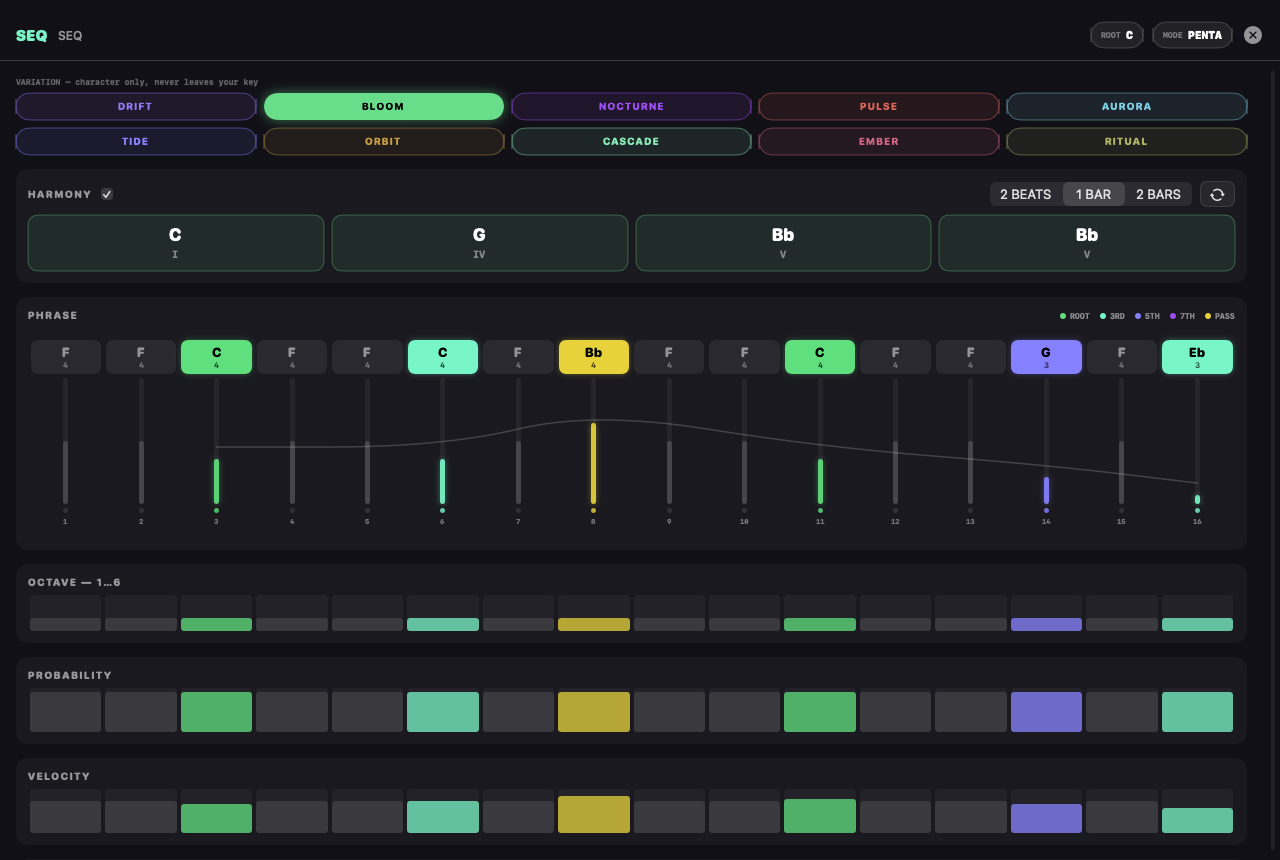
SEQ is a 16-step generative sequencer built around one idea: key and character are separate controls. ROOT and MODE are set once, in the editor's key menu; the ten VARIATION moods change everything else — progressions, sevenths, chord rhythm, melodic contour, register, hit density — computed in degree space, so two SEQs in the same key can never clash.
The editor
Pitch grid — draw degrees; colors mark chord roles (root / 3rd / 5th / 7th / passing). Tap toggles a step, drag draws.
RATCHET lane — 1–4 retriggers inside the gate window, per step.
CONDITION lane — fire always, every 2nd loop, every 4th, or on the FILL pass.
Chord track — when harmony is on, tap a card to repick the chord; the playing card lights up.
New phrase — regenerates the melody inside the current mood. Same key, new sentence.
Evolve — the machine plays itself: every N bars the phrase mutates by the amount you set.
Outputs
port
what it carries
note
pitch as MIDI note number, microtuning-aware downstream
gate
trigger with the GATE length you set
vel
per-step velocity as control voltage
c1…c4
POLY: the chord's four voices, voice-led
cgate
POLY: a gate that fires when the chord changes
POLY — one timbre per chord voice
Flip POLY on the node face and the progression that was already playing under your melody becomes patchable: c1…c4 carry the chord's voices, cgate fires at every chord change. Patch each voice into a different instrument — c1 → OSC, c2 → WTABLE, c3 → FM, c4 → KARPLUS — and one envelope on cgate plays them as a single ensemble. The melody keeps running on note/gate, a fifth voice on top.
Voice-leading (LEAD): each voice moves to the chord tone nearest its previous note — chords glide, and your timbres migrate through the harmony. CLOSE / OPEN / SPREAD force classic dispositions instead.
Both layers at once: stabs come from gate (step rate), pads from cgate (chord rate) — no mode switch, just patch both.
Custom chords: every card in the harmony track takes a quality — sus2, sus4, add9, 6th, quartal, power, cluster — or four hand-set tone offsets. All in degree space, so custom chords stay in key; on the CHROM scale the offsets become semitones and anything goes.
Triads on four voices double the root an octave up — a patched timbre never goes silent.
Harmony off + POLY on = unison ×4: four timbres, one line.
TIP
The node face shows the key read-only and a live step strip — the full instrument is behind the ≡ chip.
KINETIC
An 8-pad drum machine that thinks in steps.
THE REAL EDITOR
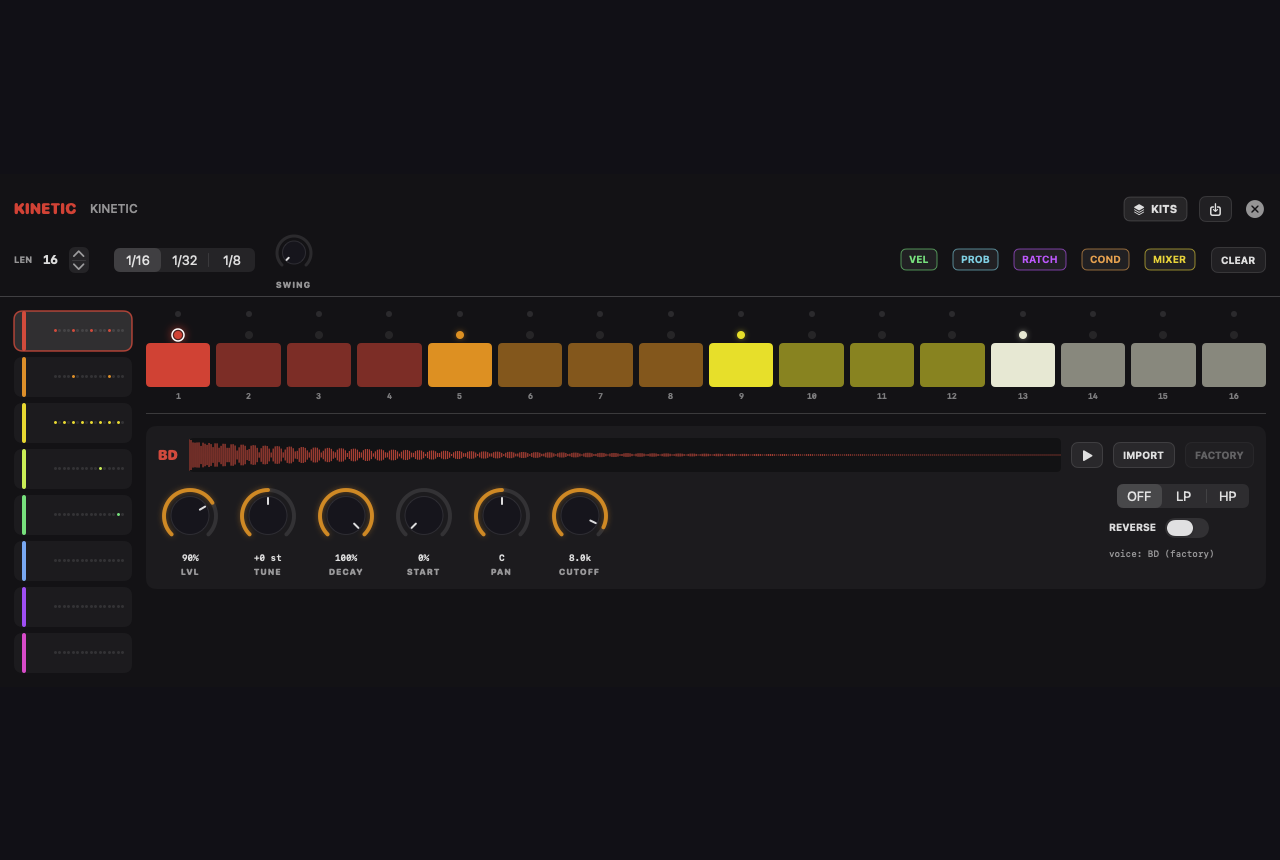
Eight pads (BD SD CH OH CP RS CB CY) loaded with REAL hardware recordings of the legendary rhythm machine — warm knob settings, not a simulation — your own samples on any pad, and a step sequencer that goes far beyond on/off. The closed hat chokes the open one. It's the law.
Pattern length — up to 64, any number
LEN runs from 1 to 64 — any value, not just multiples of 16. The grid pages 16 steps at a time; page chips appear past 16, with a white dot tracking where the playhead is running. Odd lengths against 16-step material are instant polymeters: try 23 against a SEQ and let it drift.
Per-step layers
layer
what it does
STEP
tap: on → accent (ringed) → off. Accents hit ×1.35.
VEL
per-step velocity 1–127 — drag the meter, double-tap for full
PROB
trigger probability — the dice roll at fire time
RATCH
1–4 retriggers inside the step
COND
always · 1:2 · 1:4 · FILL (every 4th loop)
Sound & mixer
Per pad: LVL, TUNE (±12 st), DECAY, START, PAN, CUTOFF with LP/HP filter, REVERSE — all on orange knobs, double-tap resets.
The MIXER page is a classic console: per-pad fader + pan, levels also exposed as node params (so scenes and MIDI learn can play them).
Single outs: each pad has its own output port, PRE or POST the internal mixer — feed a pad to its own effect chain.
External control: note picks a pad (60 + pad), gate retriggers — play KINETIC from SEQ, ARP or MIDI.
Kits
The machine has its own bank: factory grooves plus your kits (pattern + pad settings + imported audio, saved as one preset). Imported samples ride inside the kit file.
TIP
Swing lives on the pattern strip — odd steps land late, up to 75%. Combine swing with ratchets for rolls that breathe.
VYPER
Voltage in, venom out.
VYPER is a one-oscillator bass voice through a screaming 3-pole ladder filter, with the three gestures that define acid: a decay envelope on the cutoff, an ACCENT whose charge compounds across consecutive accented notes, and SLIDES that glide pitch without retriggering. A post-filter asymmetric DRIVE takes it from clean to rave.
Two brains
Internal — unwired, it plays its own two 16-step patterns. The editor (≡) is a modern silver-box grid: pitch lane, octave, ACC, SLD, gate cycling note→tie→rest, KEY/DIV/SWING.
External — cable note+gate from anything (SEQ, ARP, MIDI, KINETIC…) and VYPER becomes the voice: legato slides automatically, acc/sld CV inputs expose the accent and slide circuits to the patch.
A / B and the MRPH bar
Two patterns live in the node. The MRPH bar blends them PER STEP through a stable lottery — 0 plays A, 1 plays B, halfway plays an interleaved hybrid that never changes until you move the bar. Cable an LFO into it, morph it with scenes, draw it across a TIMELINE: the line evolves for hours.
NEW PHRASE
Five styles — CLASSIC, ROLLING, HYPNO, CHROME, DARK — generate lines that cannot go wrong: root-heavy, accent-aware, always landing home.
MUTATE nudges the current pattern: three small changes, taste preserved.
TIP
The env output is the filter envelope as CV — cable the squelch into a PLASMA's warp or a LENS orbit and the bassline draws the room. No silver box ever did that.
KEYS
Ten fingers on glass — or a QWERTY keybed on the Mac.
KEYS is the playable keyboard of the instrument: a note-and-gate source with a dedicated performance panel — tap the node's editor chip and a real keybed slides up, sized for hands and multitouch. Notes go straight into the audio thread: no queue, no round-trip, press = sound.
MONO — one note + gate pair drives a voice: patch it into an OSC and an ENV and play.
POLY — the toggle grows the node to four voice pairs (n1…n4 / g1…g4) with a voice allocator: patch four voices (or feed VOICES) and play chords.
Octave — shift the panel's range from the panel itself; the node remembers.
Mac: the QWERTY keybed
On the Mac, while the KEYS panel is open, your computer keyboard becomes the keybed: the A-row plays the white keys, the W-row the black keys — the classic layout every DAW user already knows — and Z / X shift octaves. Hold multiple keys for chords in POLY. Close the panel and the keyboard goes back to being a keyboard.
TIP
KEYS pairs beautifully with VYPER for played (not sequenced) acid lines, and with the wand: generate an effect with AURIS, then play through it live.
GRANULAR
A cloud instrument: sample in, weather out.
THE REAL EDITOR
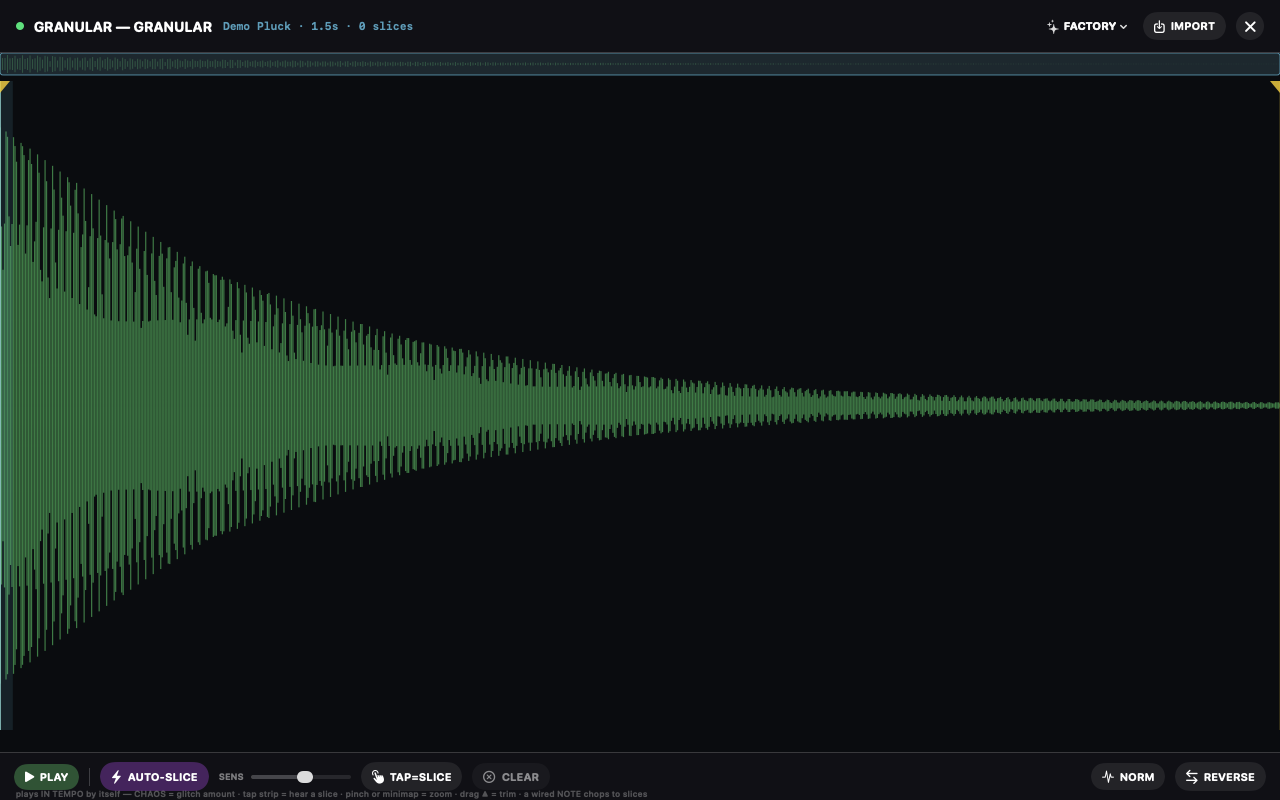
GRANULAR scatters windowed grains over a sample and plays the cloud as an instrument. Feed it a note stream and it becomes a pitched voice; leave it free and it's a texture engine.
The editor
Waveform theatre — zoom, pan, set the trim region by dragging its edges; the active region is what the cloud grazes.
Slices — drop markers; slice mode walks them as scan anchors.
Audition — preview the sample (or a slice) through the master, even with the transport stopped.
Destructive tools (normalize, reverse) keep your slice markers where they belong.
Ports
port
role
note
transposes the cloud — play it like a sampler
chaos
scatters position/size/pan per grain
gate
triggers/gates the cloud envelope
TIP
Small grains + high density = smeared pads. Large grains + low density = rhythmic stutter. Chaos turns either into weather.
WTABLE
2048-sample frames, morphed — import wavetables or draw your own.
THE REAL EDITOR
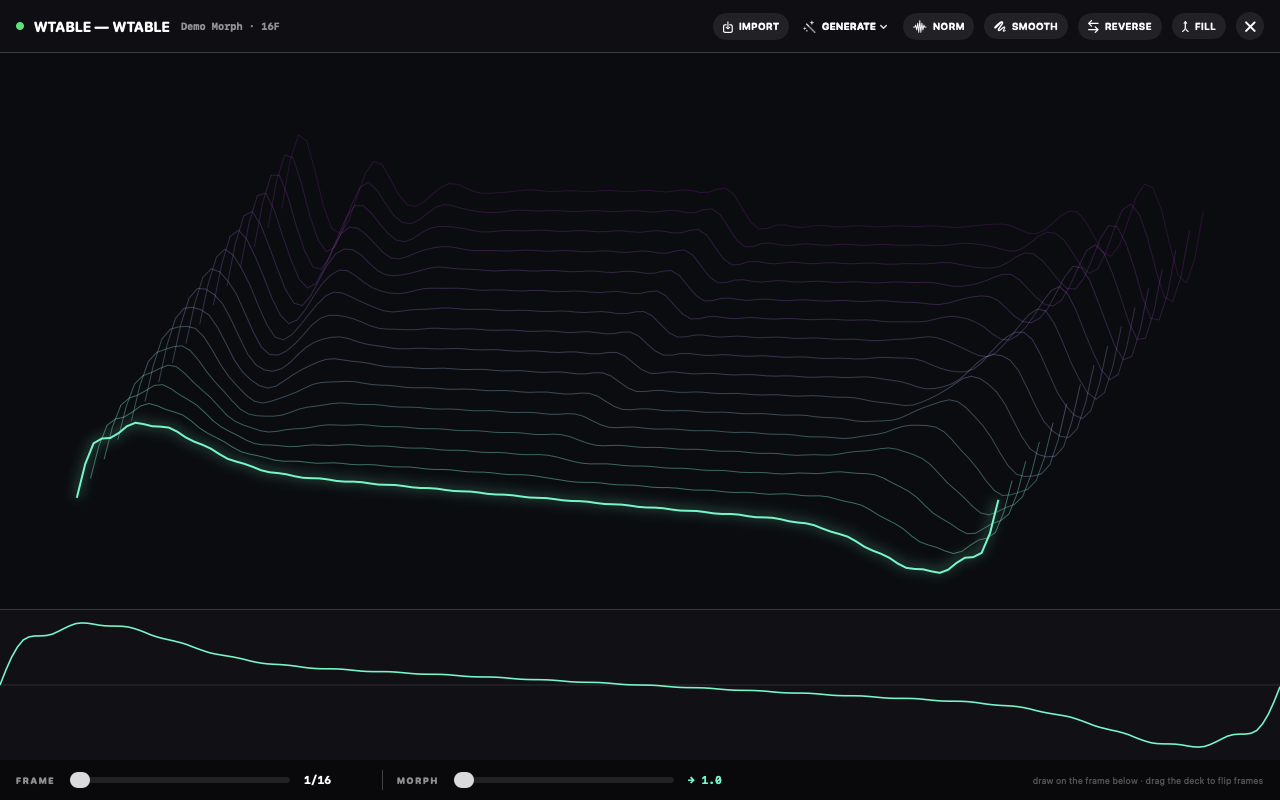
A wavetable oscillator: single-cycle frames of 2048 samples, swept through with POS (knob or CV — an LFO on morph makes the timbre travel while you play). Empty, it ships with eight built-in shapes; the editor makes the table yours.
The editor
Import standard wavetable WAVs (2048-frame files land as-is).
Draw frames by hand and reprocess them — the strip shows every frame, the morph path is what POS travels.
NOTE in plays it like any voice; DETUNE in semitones on the face.
TIP
SEQ note → WTABLE note · LFO → morph — the classic moving-timbre voice in two cables.
REEL
A video sampler: the movie is the instrument.
THE REAL EDITOR
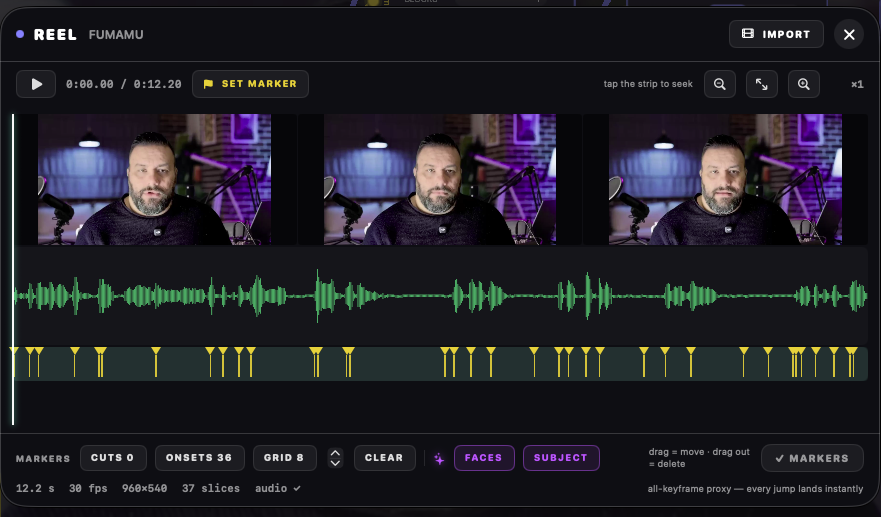
Import a clip and REEL turns it into a playable machine: the video is transcoded once to an all-keyframe proxy (every jump lands instantly) and analyzed — scene cuts and audio onsets become markers, markers make slices, and the clip's own audio is sliced in sample-sync with the picture.
Modes
mode
behavior
LOOP
plays A→B at RATE — negative RATE runs the film backwards, pitch follows (tape law)
SLICE
notes fire slices: note 60 = slice 0, 61 = slice 1… A slice plays to the NEXT marker; only a new slice cuts it short — rests never interrupt (the sampler law)
SCRUB
the head chases the scrub CV — an LFO here is video scratching
The editor
Zoom — pinch, or the − / FIT / + chips; keyframes and waveform re-render for the window you're in.
Preview transport — play/stop the clip through the master, fully detached from the patch: position markers with the sound in your ears.
Marker flow — click the timeline to place the edit cursor, hit SET MARKER to plant one; drag markers to move, drag them out of the lane to delete.
AUTO row — CUTS (scene changes), ONSETS (audio transients), GRID n, CLEAR: all STAGED — nothing touches the engine until ✓ MARKERS.
✦ VISION — content markers, computed on demand and cached: FACES (a face appears, moves, leans in) and SUBJECT (the scene changes meaning, not just brightness).
Performance ports & outs
port
role
slice / gate / scrub
the playing inputs — note-select, fire, chase
stut / jump / frz
stutter window · chance-jump to a random marker · freeze picture+sound
x / y / zoom / spin
the frame's own XFORM — place several REELs on one canvas
out
the clip's audio, stereo, sliced with the picture
tex
the picture — process it like any visual
lum / mrk
frame brightness as CV · a pulse on every marker crossing
TIP
MRK → KINETIC gate: the montage plays the drums. LUM → FILTER cut: bright scenes open the sound.
AURIS
Write your own DSP, one sample at a time — it speaks GRAIN.
THE REAL EDITOR
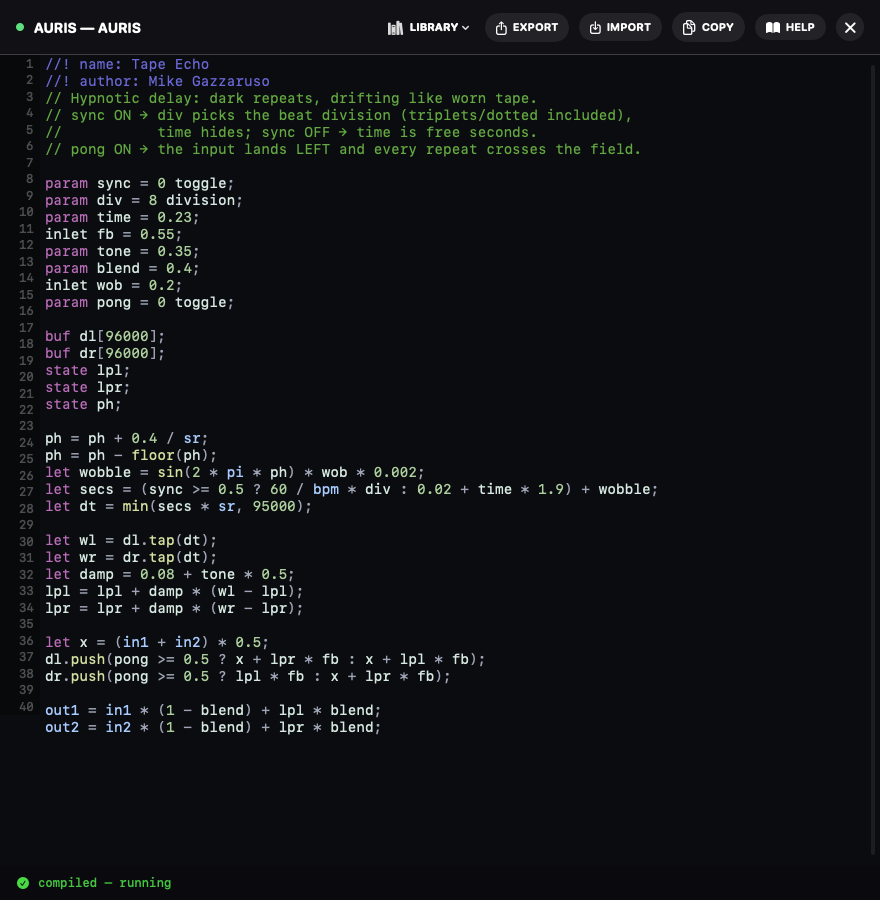
AURIS is the node that speaks GRAIN AUDIO — VISUALSOUND's own DSP language, created by Mike Gazzaruso. You type signal math; the node compiles it live into a bytecode program that runs on the audio thread — 48 000 times a second, allocation-free, glitch-free.
//! name: My First Grain
inlet level = 0.8;
out1 = in1 * level;
out2 = in2 * level;
Why it matters
param lines become real knobs on the node face; inlet lines add control ports — LFOs and envelopes modulate your code at audio rate.
buf delay lines survive live recompiles: edit the code while the echo rings, the tail keeps ringing.
The LIBRARY chip loads six complete factory effects — Tape Echo, Cathedral, Dream Chorus, Liquid Flanger, Lo-Fi Crusher, Cosmic Comb — each a readable lesson.
Scripts export/import as .grain text files. Share them anywhere.
The wand — describe it, get code
The wand button on the editor is an AI that writes GRAIN for you. Type what you hear in your head — "a dark tape echo that wobbles", "a telephone voice from an old movie" — and it answers with a working program: a one-line plan of the blocks it chose, then the code, already compiled and checked. If the request is outside what GRAIN can do (pitch detection, loading files, FFT tricks), it says so honestly in amber instead of faking it.
Runs entirely on your device, on the Apple-silicon GPU. No cloud, no account — it works in airplane mode.
First use offers DOWNLOAD THE BRAIN: a free one-time ~1.5 GB model download with byte-level progress and integrity check. After that, it's yours forever, offline.
Every generation passes the real GRAIN compiler before it reaches the editor — the wand cannot hand you code that doesn't run.
Strict, like a stage
An AURIS that doesn't compile shows a red border and blocks Play — the last good program keeps running meanwhile, and the error points at line and column. No half-broken shows.
And the language doesn't stop at sound: LUMEN runs the same GRAIN code once per pixel on the GPU, SCRIBE once per tick over words and values — the next two chapters.
The full language reference — every keyword, operator, function, buffer command and recipe — is one tap away:
LUMEN
GRAIN for pixels — the same code that bends your delay bends your light.
LUMEN is a visual node that speaks GRAIN. The exact same language — same knobs, same math, same compiler — but the program runs once per pixel, every frame, on the GPU. Type a line, see light. Keystroke to pixels is one live recompile: this is an instrument you can live-code on stage.
inlet glow = 0.6;
let cx = x - 0.5;
let cy = y - 0.5;
let d = sqrt(cx * cx + cy * cy);
r = (0.5 + 0.5 * sin(d * 28 - t * 3)) * glow + bass;
b = (1 - d * 1.4) * glow + high * 0.5;
What changes from GRAIN
builtin
meaning
x, y
this pixel's position, 0…1 (y grows upward)
r, g, b
the color you emit — black unless you say otherwise
level bass mid high
the node's audio: wire its audio port, or it follows the master mix
pick(dx, dy)
brightness of the input texture at an offset — warps, lenses, CRT looks
state
THIS PIXEL one frame ago — trails, decay, peak-hold
param and inlet work exactly as in GRAIN: knobs on the node face, control ports on the node — an LFO plays your code.
Audio-only pieces (in1/out1, sr, buf) are clear compile errors: the editor tells you what to use instead.
The LIBRARY chip ships eight looks — Aurora, Scanlines, Neon Rain, Stardust, Warp Lens, Meter, plus Pump Zoom and Edge Fire, which drive the tex AND audio inputs together.
LUMEN has a texture input (for pick) and an audio input (for the bands) — it's a generator and an effect.
Light, not sound
A broken LUMEN never blocks Play. It wears the red border and keeps rendering the last good look while you fix the line — the strict rule protects the stage, and pixels aren't the stage's heartbeat.
TIP
LUMEN's output is an ordinary texture: send it through BLOOM, FEEDBACK, KALEIDO — or into another LUMEN's tex input and process it with code.
The full reference — with a dedicated visual-context section — is one tap away:
SCRIBE
GRAIN DATA — words and values from your signals.
SCRIBE is the third body of GRAIN. It runs about 30 times a second on the main thread — far from the audio path, which is why it can do what the other two can't: strings. It reads your signals (data, control, notes, gates, audio features) and emits DATA — text, numbers, flags — on silver cables.
state word = "READY";
word = rise(gate) ? notename(note) : word;
out1 = word + "  ·  " + format(bpm, 0) + " BPM";
The set, solved
Wire o1 into a TEXT node's text port and whatever string you compose replaces the text on screen, live — the playing note by name, the bar counter, a peak readout, a message that answers another SCRIBE. No pre-written lines: the text is computed.
Ports
port
role
d1, d2
DATA in — values from other SCRIBEs
c1, c2
control in — CV sampled every tick
note, gate
a note stream (notename, rise/fall)
audio
read as level / bass / mid / high in code
o1 … o4
DATA out — text, numbers, flags
param/inlet work exactly as in AURIS and LUMEN — same knobs, same additive law.
state persists between ticks and can hold TEXT: counters, peaks, the last word seen.
The LIBRARY ships Note Ticker, Peak Meter and Bar Counter — three readable lessons.
A broken SCRIBE never blocks Play: last good program keeps ticking, red border while you fix it.
TIP
Chain SCRIBEs: d1/d2 carry values BETWEEN them, so one can compute and another can phrase. out2 flags make cheap logic — trip a message when the peak clips.
The full GRAIN DATA reference is one tap away:
3D GEOMETRY
Sculpt space itself — then point a lens at it.
THE REAL EDITOR
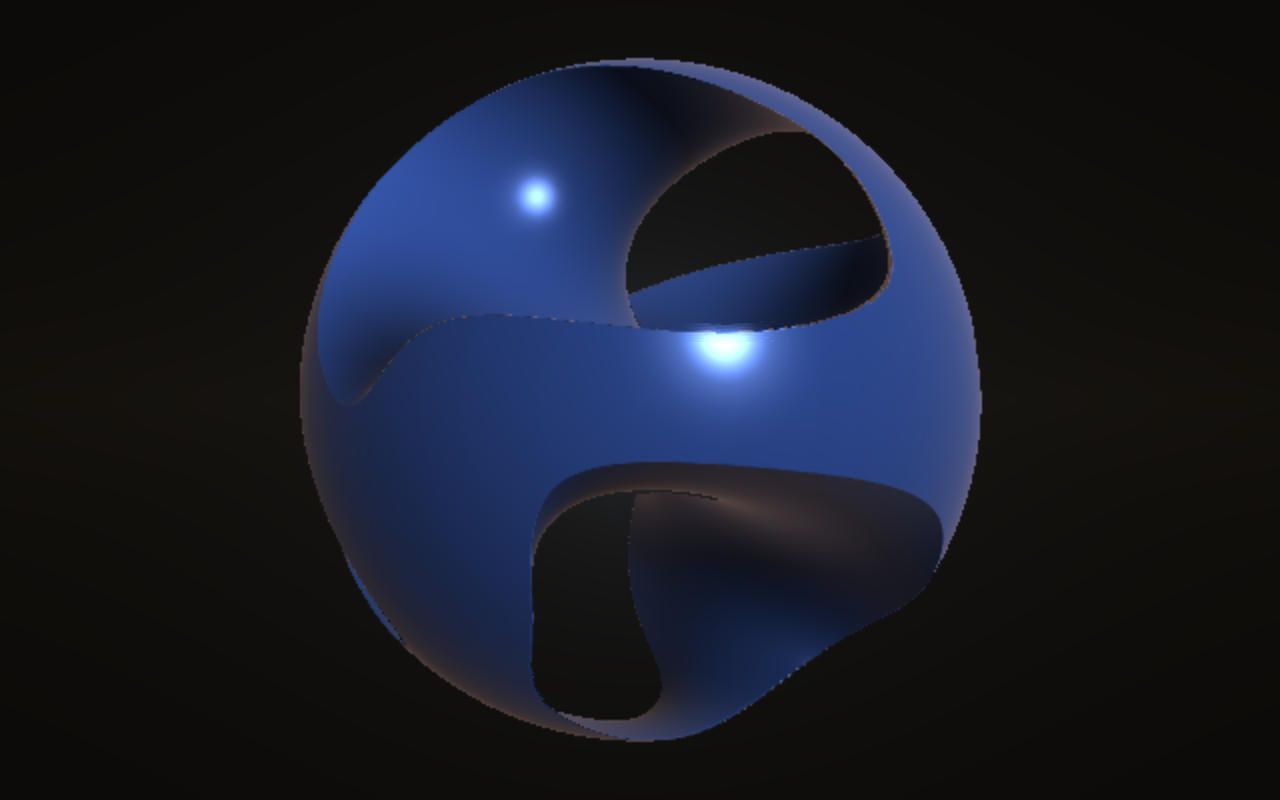
The Geometry domain is a fourth cable type: violet ports that carry shape, not sound or pixels. Geometry nodes never render anything themselves — they describe a 3D scene as pure mathematics (signed distance fields), and one node turns it into image: LENS, the camera. Everything upstream of a LENS is sculpture; everything downstream is ordinary visual signal, so BLOOM, FEEDBACK, KALEIDO and the whole 2D chain work on 3D for free.
an infinite landscape from noise — and from the audio spectrum
MELD
smoothly fuse two shapes; K sets how liquid the weld is
CARVE
boolean sculpting: cut B out of A, or keep only the overlap
TWIST
wring the space around an axis
RIPPLE
wave displacement across any surface
SWELL
inflate a form — or hollow it into a shell
REFLECT
mirror across axes: one form becomes a symmetric family
LATTICE
repeat a form into an infinite grid, in 1, 2 or 3 dimensions
LENS
the camera: orbit, pitch, dolly, fov, light, fog, glow, material → texture out
TRACE
the audio waveform, extruded — your bass line as a 3D ribbon
GLYPH
3D type: the node's text as sculpture (rename the node, resculpt the word)
Two minutes to liquid 3D
Add two FORMs (make one a CUBE), a MELD, a LENS and a VOUT.
Cable FORM → MELD a, FORM → MELD b, MELD → LENS geo, LENS → VOUT.
Drag the forms' x apart, then raise MELD's k — watch them fuse like mercury.
Cable an FFT into MELD's k inlet: the music now welds the geometry.
Cable an LFO into LENS orbit: the camera circles your sculpture on its own.
Sound in, shape out
Every geometry parameter has a control inlet — the same law as everywhere else: CV adds to the knob, clamped to its range. The LENS also has a REACT knob (audio pulses light, glow and a subtle dolly-push) and an audio input: wire a signal there and any TERRAIN in the scene grows spectrum ridges — your mix becomes a mountain range scrolling under the camera.
Materials & color
PRISM — every FORM wears its own hue; MELD blends colors where shapes fuse.
CHROME — iridescence from the surface normal, tinted by the LENS hue.
MONO — one hue for everything: the sculpture as a single material.
TIP
Double-click any violet cable for a live 3D probe — a mini-render of the geometry flowing through that exact point of the chain, default camera, always spinning.
NOTE
The scene compiles to a distance program the GPU walks per pixel. It is capped at 48 ops — REFLECT and LATTICE are the cheap way to look infinite; chains of MELDs off one shared FORM are the expensive way.
SUBPATCHES & WIRING
Build instruments inside instruments.
SUBPATCH
Select two or more nodes and hit GROUP — they collapse into one box; cables through the boundary become INLET / OUTLET pass-throughs automatically.
INLET / OUTLET nodes define the box's ports (top-to-bottom order); their dropdown sets the domain.
Double-tap the box to enter it — the breadcrumb bar tracks where you are. Subpatches nest freely.
EXPOSE a node inside and its params appear on the box face, grouped under its name, in its color — with the editor chip riding along for SEQ/AURIS/KINETIC.
Wiring utilities
node
one-line job
PORTAL▸ / ▸PORTAL
wireless cable per channel + type, all domains, cross-subpatch
LOOP▸ / ▸LOOP
legal audio feedback: ▸LOOP replays what LOOP▸ wrote one block ago — cycles, shimmer, no-input mixing
FORK
route one signal to a or b on a condition
RAILS
four drawn CV lanes, stepped by a clock
RESHAPE
remap a range with a curve
RAMP
a triggered line generator
TALLY
count triggers into a CV
TRIPWIRE
fire when a signal crosses a threshold
LADDER
stepped quantize of a CV
DEFER
delay a control signal
S&H / QUANT / LOGIC
sample-and-hold, pitch quantize, boolean math
EYE
a live value readout pinned to the canvas
SPARK
a bang/toggle button on the node face
TIP
MACRO turns one knob into four scaled outputs (amount + offset each) — one gesture, four destinations. VOICES unpacks poly MIDI into 4 note+gate pairs.
PERFORMING
Scenes, morphs, hardware, motion — the show layer.
Scenes
Eight pads in the footer. Hold to store the current knob state, tap to recall.
Recalled while playing, scenes morph in time: the chip cycles CUT / 1 / 2 / 4 / 8 bars. Continuous params glide, discrete ones switch at the halfway point. Stopped = instant.
Stored pads show a lit LED; the active pad glows solid. Scenes save with the preset — and a preset with scenes opens on its first scene, exactly where its author left the show.
MIDI learn
Arm MIDI, tap any knob (canvas bars included), move a controller CC — bound. The map is per-preset; tapping a bound knob in learn mode unbinds it. Bindings resolve to the actual engine parameter, so they keep working inside subpatches.
Motion record
Arm MOT and play: every knob gesture is recorded into a dense 4-bar loop (8 samples per beat) and replays on the transport clock. Touch the knob again and your hand takes over; release and the loop resumes. Long-press MOT to clear everything.
TIMELINE — the show, sequenced
The TIMELINE node lays an arrangement over N bars: a breakpoint CV curve (play any knob over minutes, not beats) and event markers that fire trig — and can recall the eight scenes, in order, while you never touch the glass. LOOP for an installation that lives; one-shot for a piece with an ending. The editor is behind the ≡ chip.
Installation mode
The sparkles.tv button (or the Settings toggle, for launch-time) hides every scrap of interface and gives the room to the visuals, at full brightness. Tap or Esc brings the cockpit back. With autoplay on, the piece starts itself — gallery-ready.
VS REMOTE
The show on the wall. The controls in your hand.
A LIVE SESSION, IN THE HAND
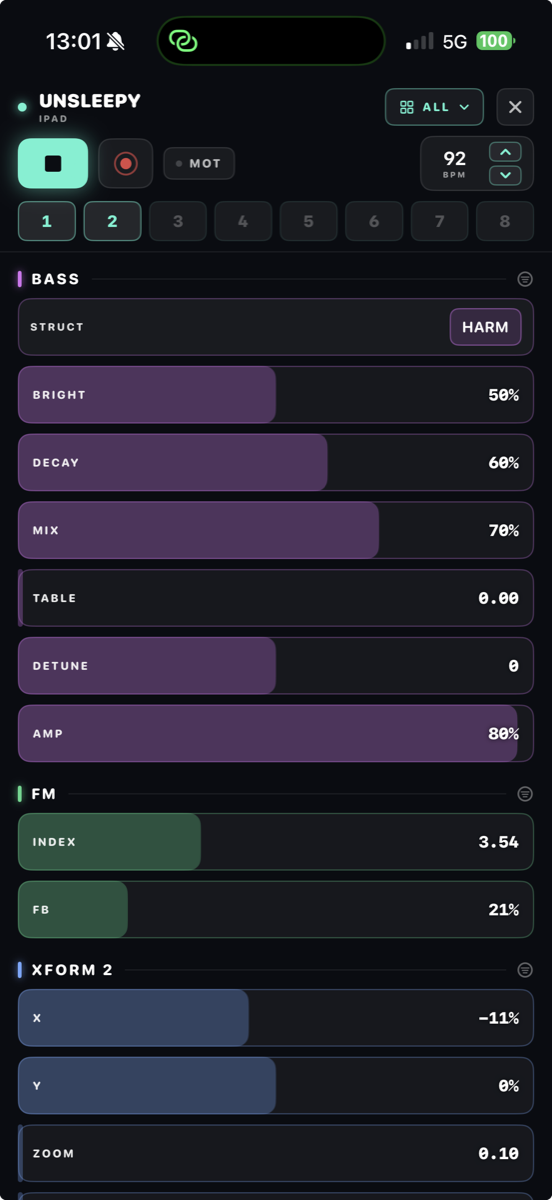
Run VisualSound on an iPhone and it becomes a remote controller for the instrument on your iPad or Mac — same app, same Wi-Fi, no extra hardware. Blackout the interface with installation mode, give the projector the whole canvas, then walk the room and play every exposed parameter from your pocket.
Linking up
On the host (iPad/Mac): arm LINK in the header. The chip shows how many remotes are on the line.
On the iPhone: open the app — hosts on your Wi-Fi appear by name. Tap one to connect.
Several phones can join at once; the last touch wins on any control.
Exposing modules
With LINK armed, select any module and tap EXPOSE TO REMOTE in the footer — its params land on every connected phone, grouped under the machine's name, with real values and real units.
Exposed modules wear a small teal ring next to their power LED.
The exposed set is remembered per project: close and reopen the session, the phone finds the same surface.
Playing from the phone
Faders — continuous params are full-width horizontal faders: drag left/right to play, up/down still scrolls the page. Double-tap resets to default, as everywhere.
Chips & toggles — tap cycles an option (long-press for the full menu); toggles flip on tap.
Transport — start/stop the set, roll a recording, arm motion record and step the tempo, all from the phone.
Scenes — the host's eight PERFORM pads ride along: recall (and morph) the whole show from across the room.
Long-press a module's nameplate to choose which of its params show on the surface.
DECKs
A DECK is your own arrangement of the surface: which modules, in what order, with which params visible. Decks are saved on the phone, bound to the host project, and every edit saves itself — they reappear whenever that project is loaded. Each session opens on ALL (everything exposed, host order); build a deck from the menu when the show has a shape.
TIP
The remote never needs the patch on screen: it works exactly the same while the host is in installation mode — that's the point.
RECORDING & EXPORT
From the room to a file, without leaving the canvas.
Live capture
REC captures the master, sample-accurate, straight from the audio engine.
When a VOUT is live, video records too — timestamped from the audio clock, so image and sound can never drift.
Stop → one shareable file: a .mov with both, or a .wav for audio-only takes. The share bar slides up when it's ready.
Offline bounce
Long-press REC: Master at 4, 8 or 16 bars — rendered offline, faster than real time, bar-exact.
Stems: one file per OUT node. Name your OUTs, get named stems.
Patch as text
Presets export and import as .vspatch files — the whole canvas as JSON, embedded samples included. Mail a patch, version it, post it. The preset browser has both buttons.
NOTE
Recording runs on a lock-free path that never touches the audio thread's timing — but video capture is real GPU work; on battery, expect the fans to know.
MIDI & TUNING
Hardware in, microtones everywhere.
MIDI in
The MIDI node turns your controller into patch signals: note + gate/velocity CV, port and channel selectable on the node.
VOICES unpacks polyphony: four voices, four note+gate pairs, oldest-note stealing — wire four OSCs and play chords.
MIDI learn (header) binds CCs to any knob — see Performing.
MIDI out
The MIDI OUT node sends notes to hardware and other apps: cable any note+gate (SEQ, ARP, VOICES, KINETIC…) into it and pick a destination — or use the built-in virtual source that DAWs see as "VisualSound Out".
TUNE ships the global microtuning as pitch bend: your Scala scale plays the external synth. Match the BEND range on the receiving synth (it is also sent as an RPN).
MPE gives every note its own channel with its own bend — real per-note microtuning for chords. Set the receiver to MPE too.
Microtuning
Tuning is global: every pitched module — oscillators, samplers, strings, FM, resonators — resolves notes through one table. In Settings, pick 12-TET, any EDO from 5 to 96, or import a Scala.scl file (cents and ratios both supported, one degree per semitone from middle C).
TIP
19-EDO on a KARPLUS with a slow ARP is a cheap ticket to somewhere else entirely.
PLUGINS
Other people's instruments, patched like modules.
Two nodes turn the whole Audio Unit ecosystem into patch material: PLUG hosts an effect in the audio chain, PLUGSYNTH hosts an instrument played by note/gate/vel. AUv3 on iPad and Mac; the Mac also loads classic AUv2 — most of the plugin world.
Loading
Open the node's editor (≡ chip): every installed plugin appears, grouped by manufacturer and filtered by type — effects for PLUG, instruments for PLUGSYNTH.
Plugins run out-of-process: if one crashes, VISUALSOUND keeps playing — the node goes dry (PLUG) or silent (PLUGSYNTH) instead of taking the stage down.
Classic AUv2 on the Mac (marked V2 in the browser): the first load asks to "reduce security settings" and relaunches the app — Apple's one-time consent for every sandboxed plugin host, GarageBand included. Approve once; it returns only after an app update. AUv3 plugins never ask.
The plugin's own interface opens from the editor. Everything you set there is saved with your preset (the plugin's full state rides along).
MACROS — the point of it all
The node face shows eight MACRO bars. In the editor, map each one to any plugin parameter — the bar adopts the plugin's current value, so mapping never moves the sound. From that moment the plugin parameter is a patch citizen: cable an LFO into it, morph it with scenes, sequence it with a TIMELINE, expose it to VS Remote.
TIP
Load a synth in PLUGSYNTH, map M1 to its filter and M2 to its reverb, then draw a TIMELINE into both — a plugin you've owned for years, doing something it has never done.
SETTINGS, POWER & AUV3
The boring chapter, kept short on purpose.
Settings
Power Saver — drops the canvas to 30 fps when truly idle. The moment you touch anything, full rate.
Autoplay — the transport starts itself at launch.
Installation at launch — boots straight into the full-screen visual stage.
LUMEN half resolution — renders LUMEN nodes at half size and upsamples; off by default, relief for older iPads.
Tuning — the global microtuning table (previous chapter).
macOS: Settings live under ⌘, — iPad has the gear in the header.
Inside a DAW
VISUALSOUND ships as an AUv3 on Mac and iPad — the full canvas inside your host.
The host owns tempo and transport: BPM becomes a readout, the beat clock follows the project, synced LFOs and sequencers land on the grid.
The entire patch saves inside the project file — reopen the session anywhere and the canvas is exactly where you left it.
Performance honesty
The CPU meter reads like Activity Monitor: 100% = one core. The audio engine is lock-free and allocation-free by design; the canvas culls what you can't see and sleeps when nothing moves. If the meter climbs, it's the patch working — not the paint.
GESTURES & SHORTCUTS
The whole instrument under your hands.
Canvas
drag spacepan
pinch / scroll / wheelzoom
drag node headermove node
drag port → portconnect
double-tap nodezoom to node
double-tap paramreset to default
double-click cabletoggle probe
tap power LEDbypass node
Editing
⌘C ⌘V ⌫copy · paste · delete selection
⌘Z ⇧⌘Zundo · redo
marquee + dragmulti-select
GROUP (footer)selection → subpatch
Performance
hold scene padstore scene
tap scene padrecall (morphs in time while playing)